- Home
- About Us
- CE Accreditation
-
CE Courses
- Nursing CE Courses
- Advanced Nursing Practice
- Critical Care Nursing
- Disaster and Terrorism Management
- Emergency Nursing
- Ethics, Legal and Advocacy
- Infection Control and Community Nursing
- Gerontology
- Leadership and Management
- Medical-Surgical Nursing
- Nursing Sciences
- Nursing Skills and Procedures
- Pediatric Nursing
- Perioperative Nursing
- Pharmacology
- Psychiatric / Mental Health
- State-Required Courses
- Teaching and Preceptorship
- CE Course Bundles
- Medical CME Courses
- Inservice Courses
- Nursing CE Courses
- CE Certification
- Resources
- FAQ
- Contact Us
/
CE Broker Guide
How to Report CE Credits to CE Broker
A clear, step-by-step explanation for Florida Nurses to ensure your license renewal goes smoothly.
If you’re a Florida nurse trying to meet your license renewal deadline, few things are more stressful than finishing your CE hours and not seeing them reflected in CE Broker. Understanding how CE reporting works, and how to fix problems quickly, can save you from unnecessary panic, delays, and compliance issues.
This guide provides a clear, step-by-step explanation of how to report CE credits to CE Broker in Florida, including automatic reporting, manual reporting, timelines, common mistakes, and what to do when credits don’t appear. It’s written for busy nurses who need accurate answers fast.
Why CE Broker Matters for Florida Nurses
CE Broker is the official continuing education tracking system for Florida nursing licenses. The Florida Board of Nursing uses CE Broker to verify compliance for:
- Registered Nurses (RNs)
- Licensed Practical Nurses (LPNs)
- Advanced Practice Registered Nurses (APRNs)
Important Rule
If your credits are not properly reported in CE Broker, they do not count, even if you completed the course.
This makes reporting just as important as completing the CE itself.
Understanding CE Reporting in Florida
There are two ways CE credits appear in CE Broker:
- Automatic reporting (The easiest method)
- Manual self-reporting
Which one applies depends on where you completed your CE courses.
Automatic Reporting (The Easiest Method)
What Is Automatic Reporting?
Many accredited CE providers in Florida report your completed credits directly to CE Broker. This means: you complete the course, the provider submits your credits, CE Broker updates your account, and no action is required from you.
How Long Automatic Reporting Takes:
- Same day: Some providers
- 24–72 hours: Most providers (Like NH Institute)
- Up to 7 business days: High-volume periods (renewal seasons)
Tip: If you’re close to a deadline, always verify how quickly your provider reports.
How to Check If Your CE Was Automatically Reported
- Go to CE Broker and log in to your account.
- Click Transcript.
- Review your completed hours. You can filter by course type, subject area, or mandatory courses.
- If the course appears there, it has been successfully reported.
Manual Reporting (Self-Submission)
If your CE provider does not automatically report to CE Broker, you must submit the credits yourself.
When Manual Reporting Is Required:
- The provider does not integrate with CE Broker.
- You took CE from out-of-state providers.
- You completed CE through employer training or private training programs.
- You completed academic coursework being used as CE.
How to Manually Report CE Credits
- Log in to your CE Broker account.
- Click “Report CE”.
- Select “Course or Activity”.
- Enter the required information: Course title, Provider name, Completion date, Number of hours, and Course category.
- Upload your certificate (PDF preferred).
- Submit the entry.
Once submitted, the credits usually appear immediately or within a few minutes.
Automatic vs Manual Reporting: Quick Comparison
| Features | Automatic Reporting | Manual Reporting |
|---|---|---|
| Nurse action required | None | Full submission required |
| Processing time | 1 - 7 days | Immediately |
| Risk of error | Low | Moderate |
| Documentation upload | Not required | Required (Certificate) |
| Best for | Time efficiency | Deadline control |
What To Do If Credits Don’t Appear
During peak renewal months, CE Broker processing may slow down. If you don't see your credits, follow these steps:
1
Check Your Transcript Carefully
Make sure filters aren’t hiding courses, you’re in the correct renewal cycle, and you’re logged into the correct license profile.
2
Verify with the CE Provider
Ask: Was my course submitted to CE Broker? On what date was it reported? Under what provider ID?
3
Upload Manually (If Allowed)
If the provider confirms completion and delay persists, upload the certificate manually and submit directly.
4
Contact CE Broker Support
If nothing resolves the issue, use CE Broker support, provide documentation, and request transcript verification.
Common Reporting Mistakes Florida Nurses Make
-
Assuming Automatic Reporting
Not all providers report automatically. Always verify.
-
Waiting Until the Deadline
Reporting delays can cause license noncompliance even if CE is completed.
-
Wrong Course Categories
Courses may not count toward mandatory requirements if miscategorized.
-
Incomplete Certificates
Missing provider info or hours causes rejections.
-
Wrong Renewal Cycle
Credits entered in the wrong cycle won’t count.
Mandatory CE Categories That Must Be Properly Labeled
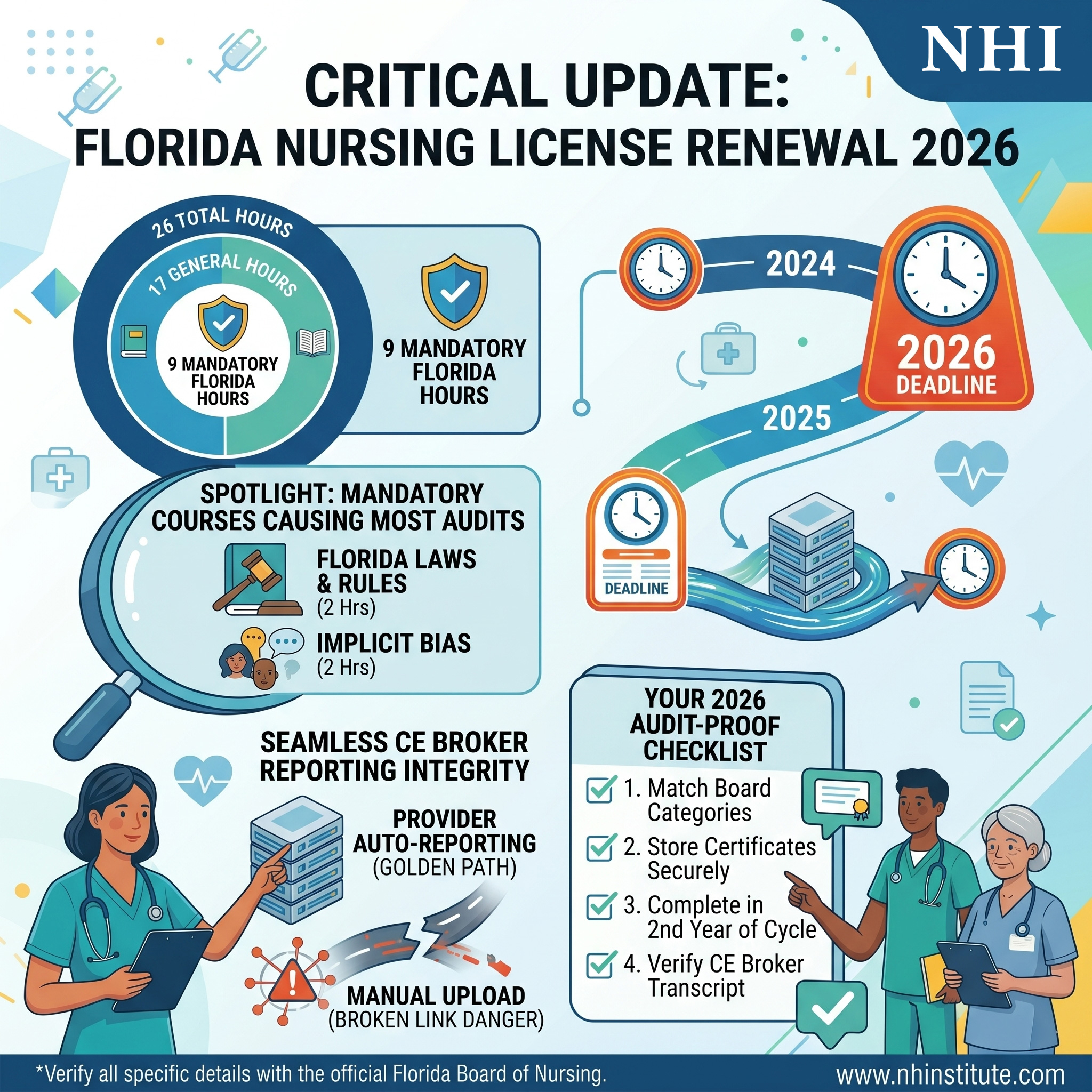
Incorrect labeling can invalidate compliance. Required Florida CE categories include: Human Trafficking, Domestic Violence, Medical Error Prevention, Laws and Rules, Implicit Bias (if applicable), HIV/AIDS (first licensure), and Controlled Substance (APRNs). If these are mislabeled as “general CE,” they may not fulfill requirements.
How to Verify You’re Fully Compliant
Never assume compliance, always verify. Use this checklist:
- All CE hours completed
- Mandatory courses completed
- Credits appear in CE Broker
- Categories correctly assigned
- Total hours meet Florida RN requirements
- Transcript shows “Compliant” status
Get Your Florida CE Bundle (Includes Auto-Reporting)
We report directly to CE Broker within 24 hours.
Best Practice: One-System Completion Strategy
To reduce risk, use a single CE provider that ensures direct CE Broker reporting. Complete all mandatory courses together and confirm your transcript in one session. This minimizes reporting errors and compliance gaps.
Connection to Florida License Renewal
CE reporting is only one part of compliance. It must align with your overall renewal requirements. For a complete overview of hours, mandatory courses, and deadlines, nurses should review their full Florida nursing license renewal requirements through trusted sources.
You can also review a full breakdown of renewal steps, CE requirements, and compliance guidance for Florida nursing license renewal here.
Final Guidance
CE completion alone is not enough. CE reporting is what makes it official. Accurate reporting protects your license, your employment, and your professional standing.
Explore Florida CE Options & Auto-ReportingContact Information
Location
Coral Gables, FL 33134Working Days/Hours
Mon - Fri / 9:00AM - 5:00PM